1. Server 2008 R2 SP1, Hyper-V in AD can't connect to VM host
2. Download KB950050:Windows Server 2008 x64 Edition 的 Hyper-V 更新
http://www.microsoft.com/zh-tw/download/details.aspx?id=18567
3. OK!

2013年3月26日 星期二
Screen Capture By Thread
1. OS: Windows 7 x64
2. Tools: VS2010, Expression 4.0
3. Prepare a class for capturing scrren and save to outputpath
class BkScnCap
{
ScreenCaptureJob job;
public BkScnCap()
{
job = new ScreenCaptureJob();
}
public void Record()
{
System.Drawing.Size monitorSize = SystemInformation.PrimaryMonitorSize;
System.Drawing.Rectangle capRect = new System.Drawing.Rectangle(0, 0, monitorSize.Width, monitorSize.Height);
job.CaptureRectangle = capRect;
job.OutputPath = @"E:\output\ScreenCap";
job.Start();
}
public void StopRecord()
{
job.Stop();
}
}
4. Make backgroud thread method in constructor, Click to start this thread and click the stop to end it.
public MainWindow()
{
InitializeComponent();
oBkScnCap = new BkScnCap();
oThread = new System.Threading.Thread(new System.Threading.ThreadStart(oBkScnCap.Record));
}
System.Threading.Thread oThread;
BkScnCap oBkScnCap;
private void 儲存影片_Click(object sender, RoutedEventArgs e)
{
oThread.Start();
}
private void 停止影片擷取_Click(object sender, RoutedEventArgs e)
{
oBkScnCap.StopRecord();
}
5. Screen resolution issue

2013年3月19日 星期二
明明就很容易Rotate Animation
1. Windows 7 x64
2. VS 2010
3. Storyboard.TargetProperty="Angle" 就可以了。
<Window x:Class="Ro2.MainWindow"
xmlns="http://schemas.microsoft.com/winfx/2006/xaml/presentation"
xmlns:x="http://schemas.microsoft.com/winfx/2006/xaml"
Title="MainWindow" Height="350" Width="525">
<Grid>
<Ellipse Width="100" Height="50" Fill="Red">
<Ellipse.RenderTransform>
<RotateTransform x:Name="Ro"/>
</Ellipse.RenderTransform>
<Ellipse.Triggers>
<EventTrigger RoutedEvent="Loaded">
<BeginStoryboard>
<Storyboard>
<DoubleAnimation Storyboard.TargetName="Ro"
Storyboard.TargetProperty="Angle"
From="0" To="360" Duration="0:0:1"
RepeatBehavior="Forever" />
</Storyboard>
</BeginStoryboard>
</EventTrigger>
</Ellipse.Triggers>
</Ellipse>
</Grid>
</Window>

2013年3月17日 星期日
Broadcasting Screen
1. Hardware A43S
2. OS: Windows 7 x 64
3. Tools: VS 2010, Expression 4 Pro
4. Download Expression SP2 http://www.microsoft.com/zh-tw/download/details.aspx?id=27870
Ref: http://stackoverflow.com/questions/6173914/realtime-stream-from-screencapture-with-microsoft-expression-encoder
5. Notes:
N1. SP1 or SP2 download and upgrade. Restart was required.
N2. Capture screen and then broadcasting into internet.
6. Coding:
LiveJob job = new LiveJob(); // Create Broadcasting object
Collection<EncoderDevice> devices = EncoderDevices.FindDevices(EncoderDeviceType.Video);
EncoderDevice device=null;
for (int i=0; i< devices.Count; i++)
if (devices[i].Name == "Screen Capture Source") device = devices[i]; // Select Screen Capture
//Source as the input device
if (device != null)
{
LiveDeviceSource source = job.AddDeviceSource(device, null);
source.ScreenCaptureSourceProperties = new ScreenCaptureSourceProperties
{
CaptureCursor = true,
CaptureLargeCursor = false,
FrameRate = 6,
CaptureLayeredWindow = true,
Height = 600,
Width = 800,
Left = 0,
Top = 0,
};
job.ActivateSource(source);
// Finds and applys a smooth streaming preset
job.ApplyPreset(LivePresets.VC1256kDSL16x9);
// Sets up variable for fomat data
var format = new PullBroadcastPublishFormat { BroadcastPort = 8080 };
job.PublishFormats.Add(format);
var data = job.BufferWindowSize;
job.StartEncoding();
Console.Write("Press Enter then to stop the broadcasting.");
Console.ReadLine();
job.StopEncoding();
}
else
{
Console.WriteLine("Can't find Screen Capture Source.");
}
}

7. Download
2013年2月19日 星期二
Error x80004005 無法使用分享檔案
Ref : http://social.technet.microsoft.com/Forums/en-US/w7itpronetworking/thread/c9f17816-9ef3-4249-98e6-5de990112d3d/
不知甚麼原因將Client for Microsoft Networks 服務移除,無法使用檔案分享.
加入服務後"重新開機"可以解決!

不知甚麼原因將Client for Microsoft Networks 服務移除,無法使用檔案分享.
加入服務後"重新開機"可以解決!

2012年12月27日 星期四
Word 無法刪除格線
Word 2010 x64 版(OS: Windows 7)
1. 三個 '-' 可以產生分隔線。
2. 運氣不好'文字格線被設定時,貼齊格線'被啟用。
3. 無法刪除格線。
4. 解決之道
上下各加一空白段落,將格線夾在中間
進格式解除

1. 三個 '-' 可以產生分隔線。
2. 運氣不好'文字格線被設定時,貼齊格線'被啟用。
3. 無法刪除格線。
4. 解決之道
上下各加一空白段落,將格線夾在中間
進格式解除

5. 刪除此上下空白選項即可。
2012年12月19日 星期三
Process Stereo Video Files 1 -- Merge Files
1. Objective : Merge 2 files.
2. Hardware:
2-1 HTC EVO : Acquire stereo files in mp4 format.
2-2 ASUS a43sv (Windows 7 x 64)
2-3 Software:
2-3-1. Freemake video converter 3.2.1.0 : Convert mp4 to wmv.
2-3-2. Expression 4.0 pro (w/o codec): can't process mp4 file.
2-3-3. Visual studio 2010 (x86)
2-3-4. CyberLink PowerDVD10 : Play stereo video
3 C# procedure
3-1. Load 2 stereo files in wmv format (Converted by Freemake Video Converter)
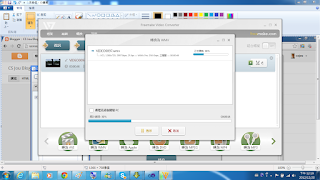
2. Hardware:
2-1 HTC EVO : Acquire stereo files in mp4 format.
2-2 ASUS a43sv (Windows 7 x 64)
2-3 Software:
2-3-1. Freemake video converter 3.2.1.0 : Convert mp4 to wmv.
2-3-2. Expression 4.0 pro (w/o codec): can't process mp4 file.
2-3-3. Visual studio 2010 (x86)
2-3-4. CyberLink PowerDVD10 : Play stereo video
3 C# procedure
3-1. Load 2 stereo files in wmv format (Converted by Freemake Video Converter)

3-2. Merge 2 files by the method from expression sample program.
3-3. Call a process to start cyberlink powerdvd and play the merge file.
3-4. A button allows user to kill the process of the player.
4程式下載
訂閱:
文章 (Atom)