Ref: http://forum.gamer.com.tw/C.php?bsn=60030&snA=356116
1. Windows 8.1 user: Administrator
2. Install Python 2.6.6
即便更改新版,仍持續出現"機碼用在特定狀態時無效"
3. 參考 Ref 改帳號
4. 改用具administratorsr角色的 帳號,安裝OK。
2014年9月2日 星期二

2014年9月1日 星期一
PowerShell Basic -- I Foreach
To start or stop VMs (W7SQLH2V1 - W7SQLH2V3)
1. Start VMs
$VM = Get-VM -Name "W7SQLH2*"
Foreach ($iVM in $VM)
{
Start-VM -VM $iVM
}
2. Stop VMs
$VM = Get-VM -Name "W7SQLH2*"
Foreach ($iVM in $VM)
{
Stop-VM -VM $iVM
}
3. Stop a classroom and then start another classroom
$VM1 = Get-VM -Name "W7SQL*"
Foreach ($iVM in $VM1)
{
Stop-VM -VM $iVM
}
$VM2 = Get-VM -Name "W7eclipse*"
Foreach ($iVM in $VM2)
{
Start-VM -VM $iVM
}
4. VMM 2008 Module import
Add-PSSnapin Microsoft.SystemCenter.VirtualMachineManager
Get-VMMServer -ComputerName serverRealName
$VM2 = Get-VM -Name "W7eclipse*"
Foreach ($iVM in $VM2)
{
Stop-VM -VM $iVM
}
1. Start VMs
$VM = Get-VM -Name "W7SQLH2*"
Foreach ($iVM in $VM)
{
Start-VM -VM $iVM
}
2. Stop VMs
$VM = Get-VM -Name "W7SQLH2*"
Foreach ($iVM in $VM)
{
Stop-VM -VM $iVM
}
3. Stop a classroom and then start another classroom
$VM1 = Get-VM -Name "W7SQL*"
Foreach ($iVM in $VM1)
{
Stop-VM -VM $iVM
}
$VM2 = Get-VM -Name "W7eclipse*"
Foreach ($iVM in $VM2)
{
Start-VM -VM $iVM
}
4. VMM 2008 Module import
Add-PSSnapin Microsoft.SystemCenter.VirtualMachineManager
Get-VMMServer -ComputerName serverRealName
$VM2 = Get-VM -Name "W7eclipse*"
Foreach ($iVM in $VM2)
{
Stop-VM -VM $iVM
}
2014年8月11日 星期一
WPF Datagrid vs Access Database
<DataGrid Margin="0,30,0,0" ItemsSource="{Binding GridData}" Name="dataGrid1" CanUserAddRows="False" AutoGenerateColumns="False" RowEditEnding="dataGrid1_RowEditEnding" >
<DataGrid.Columns>
<DataGridTextColumn Binding="{Binding ID, NotifyOnTargetUpdated=True,Mode=TwoWay, UpdateSourceTrigger=PropertyChanged}" Width="100" Header="ID" IsReadOnly="True" />
<DataGridTextColumn Binding="{Binding 食物名稱, NotifyOnTargetUpdated=True, Mode=TwoWay, UpdateSourceTrigger=PropertyChanged}" Width="100" Header="食物名稱"/>
<DataGridTextColumn Binding="{Binding 熱量(Kcal), NotifyOnSourceUpdated=True, Mode=TwoWay,UpdateSourceTrigger=PropertyChanged}" Width="100" Header="熱量(Kcal)"/>
<DataGridTextColumn Binding="{Binding 水分(g), NotifyOnTargetUpdated=True,Mode=TwoWay, UpdateSourceTrigger=PropertyChanged}" Width="100" Header="水分(g)"/>
<DataGridTextColumn Binding="{Binding 粗蛋白(g), NotifyOnTargetUpdated=True,Mode=TwoWay, UpdateSourceTrigger=PropertyChanged}" Width="100" Header="粗蛋白(g)"/>
<DataGridTextColumn Binding="{Binding 粗脂肪(g), NotifyOnTargetUpdated=True,Mode=TwoWay, UpdateSourceTrigger=PropertyChanged}" Width="100" Header="粗脂肪(g)"/>
<DataGridTextColumn Binding="{Binding 碳水化合物(g), NotifyOnTargetUpdated=True,Mode=TwoWay, UpdateSourceTrigger=PropertyChanged}" Width="100" Header="碳水化合物(g)"/>
</DataGrid.Columns>
</DataGrid>
private void dataGrid1_RowEditEnding(object sender, DataGridRowEditEndingEventArgs e)
{
myConnection.Open();
using (OleDbCommand cmd =
new OleDbCommand("UPDATE 肉類 SET
[食物名稱]='" + ((DataRowView)e.Row.Item)["食物名稱"].ToString() +
"', [熱量(Kcal)]=" + ((DataRowView)e.Row.Item)["熱量(Kcal)"].ToString() +
", [水分(g)]=" + ((DataRowView)e.Row.Item)["水分(g)"].ToString() +
" WHERE Id='" + ((DataRowView)e.Row.Item)["ID"].ToString() + "';" , myConnection))
{
// Not allowed in Access database
//cmd.Parameters.AddWithValue("@Id", "12345");
//cmd.Parameters.AddWithValue("@食物名稱", "DDD");
//cmd.Parameters.AddWithValue("@熱量", "222");
//cmd.Parameters.AddWithValue("@水分", "333");
int rows = cmd.ExecuteNonQuery();
this.Title = rows.ToString() ;
//rows number of record got updated
}
myConnection.Close();
}

<DataGrid.Columns>
<DataGridTextColumn Binding="{Binding ID, NotifyOnTargetUpdated=True,Mode=TwoWay, UpdateSourceTrigger=PropertyChanged}" Width="100" Header="ID" IsReadOnly="True" />
<DataGridTextColumn Binding="{Binding 食物名稱, NotifyOnTargetUpdated=True, Mode=TwoWay, UpdateSourceTrigger=PropertyChanged}" Width="100" Header="食物名稱"/>
<DataGridTextColumn Binding="{Binding 熱量(Kcal), NotifyOnSourceUpdated=True, Mode=TwoWay,UpdateSourceTrigger=PropertyChanged}" Width="100" Header="熱量(Kcal)"/>
<DataGridTextColumn Binding="{Binding 水分(g), NotifyOnTargetUpdated=True,Mode=TwoWay, UpdateSourceTrigger=PropertyChanged}" Width="100" Header="水分(g)"/>
<DataGridTextColumn Binding="{Binding 粗蛋白(g), NotifyOnTargetUpdated=True,Mode=TwoWay, UpdateSourceTrigger=PropertyChanged}" Width="100" Header="粗蛋白(g)"/>
<DataGridTextColumn Binding="{Binding 粗脂肪(g), NotifyOnTargetUpdated=True,Mode=TwoWay, UpdateSourceTrigger=PropertyChanged}" Width="100" Header="粗脂肪(g)"/>
<DataGridTextColumn Binding="{Binding 碳水化合物(g), NotifyOnTargetUpdated=True,Mode=TwoWay, UpdateSourceTrigger=PropertyChanged}" Width="100" Header="碳水化合物(g)"/>
</DataGrid.Columns>
</DataGrid>
private void dataGrid1_RowEditEnding(object sender, DataGridRowEditEndingEventArgs e)
{
myConnection.Open();
using (OleDbCommand cmd =
new OleDbCommand("UPDATE 肉類 SET
[食物名稱]='" + ((DataRowView)e.Row.Item)["食物名稱"].ToString() +
"', [熱量(Kcal)]=" + ((DataRowView)e.Row.Item)["熱量(Kcal)"].ToString() +
", [水分(g)]=" + ((DataRowView)e.Row.Item)["水分(g)"].ToString() +
" WHERE Id='" + ((DataRowView)e.Row.Item)["ID"].ToString() + "';" , myConnection))
{
// Not allowed in Access database
//cmd.Parameters.AddWithValue("@Id", "12345");
//cmd.Parameters.AddWithValue("@食物名稱", "DDD");
//cmd.Parameters.AddWithValue("@熱量", "222");
//cmd.Parameters.AddWithValue("@水分", "333");
int rows = cmd.ExecuteNonQuery();
this.Title = rows.ToString() ;
//rows number of record got updated
}
myConnection.Close();
}
2014年7月13日 星期日
Dart-2 (中文輸入)
Ref: http://ask.make-money-article.com/que/11122732
import 'dart:async';
import 'dart:io';
import 'dart:convert';
void main() {
readLine().listen(processLine);
}
Stream readLine() => stdin
.transform(UTF8.decoder)
.transform(new LineSplitter());
void processLine(String line) {
print(line);
}

import 'dart:async';
import 'dart:io';
import 'dart:convert';
void main() {
readLine().listen(processLine);
}
Stream readLine() => stdin
.transform(UTF8.decoder)
.transform(new LineSplitter());
void processLine(String line) {
print(line);
}
2014年7月12日 星期六
Dart-1
Hello World : Command line

void main() {
print("Hello, World!");
// Ref: http://www.dart-tutorials.co.uk/#Tutorials/Getting-Started
String a = "Hellow World 1";
String b = 'Hello World 2';
var c = "Hello World 3";
print('$a');
print('$b');
print('$c');
String a2 = "1";
String c2 = "1";
int b2 = 1;
print(stringToInt(a2)==b2);
print(a2==b2);
print(a2==c2);
}
int stringToInt(String value) {
return value.codeUnitAt(0)-48;
}

void main() {
print("Hello, World!");
// Ref: http://www.dart-tutorials.co.uk/#Tutorials/Getting-Started
String a = "Hellow World 1";
String b = 'Hello World 2';
var c = "Hello World 3";
print('$a');
print('$b');
print('$c');
String a2 = "1";
String c2 = "1";
int b2 = 1;
print(stringToInt(a2)==b2);
print(a2==b2);
print(a2==c2);
}
int stringToInt(String value) {
return value.codeUnitAt(0)-48;
}
2014年5月20日 星期二
Arduino Test1
Hardware : ASUS X450J
OS: Windows 8.1 Pro.
1. ARDUINO 0023 - 2011.11.09 (Arduino UNO)
2. Installation
2.1 disable windows 8.1 driver signature enforcement
http://www.howtogeek.com/167723/how-to-disable-driver-signature-verification-on-64-bit-windows-8.1-so-that-you-can-install-unsigned-drivers/
2.2 Installation driver
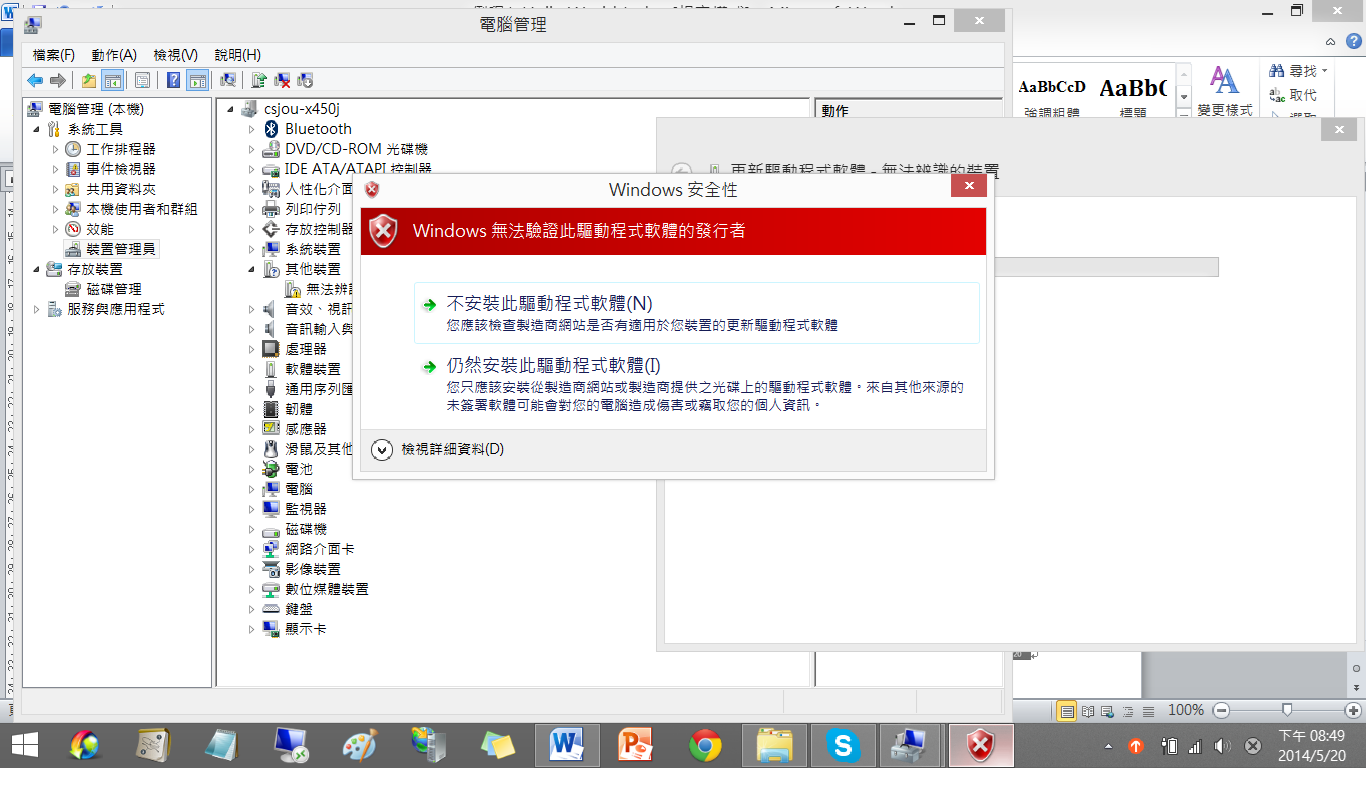

OS: Windows 8.1 Pro.
1. ARDUINO 0023 - 2011.11.09 (Arduino UNO)
2. Installation
2.1 disable windows 8.1 driver signature enforcement
http://www.howtogeek.com/167723/how-to-disable-driver-signature-verification-on-64-bit-windows-8.1-so-that-you-can-install-unsigned-drivers/
2.2 Installation driver
 |
| 3. Test hello world. |
 |
| 4. Open Serial monitor |
2014年5月12日 星期一
HMI Test1
Hardware:ASUS X450J, 2 USB2HDMI Adapter + Notebook HDMI
3x ASUS Monitora : 1920x1080
Test result:

下載 App and MainWindow classes only
下載 Final version of App and MainWindow classes only
3x ASUS Monitora : 1920x1080
Test result:
下載 App and MainWindow classes only
下載 Final version of App and MainWindow classes only
訂閱:
文章 (Atom)