1. In emgu face detection, the default settings was framework 3.5 while the System.Threading.Task seems conflict with library. Open the project by framework 3.5 and then change to 4.6 with remark //System,.Threading.Task.
2. Microsoft Oxford project face detection api installed by framework 4.5 and the System.Threading.Task is needed.
2016年12月13日 星期二

2016年11月10日 星期四
Windows 10 can't find the 2nd HD (IDE to AHCI)
Ref: http://www.tenforums.com/drivers-hardware/15006-attn-ssd-owners-enabling-ahci-mode-after-windows-10-installation.html
ASUS X450J /Replace DVD to SSD with Windows 10
Follow the procedure by REF
1. Run Command Prompt as Admin
2. Invoke a Safe Mode boot with the command: bcdedit /set {current} safeboot minimal
3. Restart the PC and enter your BIOS during bootup.
4. Change from IDE to AHCI mode then Save & Exit.
5. Windows 10 will launch in Safe Mode.
6. Right click the Window icon and select to run the Command Prompt in Admin mode from among the various options.
7. Cancel Safe Mode booting with the command: bcdedit /deletevalue {current} safeboot
8. Restart your PC once more and this time it will boot up normally but with AHCI mode activated.
9. Bask in the reflected glory of being a total Windows 10 God
It's work.
ASUS X450J /Replace DVD to SSD with Windows 10
Follow the procedure by REF
1. Run Command Prompt as Admin
2. Invoke a Safe Mode boot with the command: bcdedit /set {current} safeboot minimal
3. Restart the PC and enter your BIOS during bootup.
4. Change from IDE to AHCI mode then Save & Exit.
5. Windows 10 will launch in Safe Mode.
6. Right click the Window icon and select to run the Command Prompt in Admin mode from among the various options.
7. Cancel Safe Mode booting with the command: bcdedit /deletevalue {current} safeboot
8. Restart your PC once more and this time it will boot up normally but with AHCI mode activated.
9. Bask in the reflected glory of being a total Windows 10 God
It's work.
2016年9月13日 星期二
.NET Core (Docker)
Ref: https://www.microsoft.com/net/core#docker
ASUS X450J (Win10 Edux64)
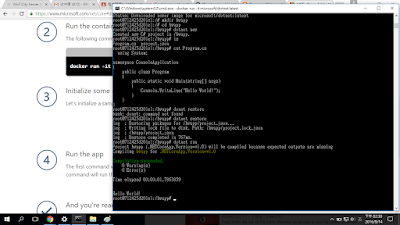
1. docker run -it microsoft/dotnet:latest
2. Create new project
2.1 mkdir hwapp
2.2 cd hwapp
2.3 dotnet new
Create Project.json and Program.cs files
Can be checked by cat Program.cs
3. dotnet restore
4. dotnet run
5. Results:
ASUS X450J (Win10 Edux64)
1. docker run -it microsoft/dotnet:latest
2. Create new project
2.1 mkdir hwapp
2.2 cd hwapp
2.3 dotnet new
Create Project.json and Program.cs files
Can be checked by cat Program.cs
3. dotnet restore
4. dotnet run
5. Results:

Tag latest not found in repository docker.io/wotcity/wotcity-io
Ref: https://github.com/docker/docker-registry/issues/637
ASUS X450J (Windows 10 Edux64)
Docker
1. Follow Ref:https://wotcity.com/blog/2015/09/07/installation-guide/
2. docker pull wotcity/wotcity-io
Error : Tag latest not found in repository docker.io/wotcity/wotcity-io
3. Solve by
docker pull -a wotcity/wotcity-io

ASUS X450J (Windows 10 Edux64)
Docker
1. Follow Ref:https://wotcity.com/blog/2015/09/07/installation-guide/
2. docker pull wotcity/wotcity-io
Error : Tag latest not found in repository docker.io/wotcity/wotcity-io
3. Solve by
docker pull -a wotcity/wotcity-io

2016年9月12日 星期一
Youtube 直播 (Windows 10)
ASUS X450J (Windows 10 Edu x64)
1. 下載 OBS (Latest Windows Release - 0.15.4)
https://obsproject.com/download#mp
2. 安裝 OBS
3. 設定場景,來源

4. Chrome 啟用Youtube (記得要登入)
5. 選擇我的頻道
6. 進入影片管理員

7. 選擇即時串流(設定標題,紀錄伺服器網址url,金鑰)
8. 回到OBS設定(Preference)

9. 在串流選擇
9.1 串流類型:自訂串流伺服器
9.2 將youtube url / 串流金鑰 依序設定
10. 回到OBS主視窗右下角,開始串流
...
11. 回到OBS主視窗右下角,停止串流
1. 下載 OBS (Latest Windows Release - 0.15.4)
https://obsproject.com/download#mp
2. 安裝 OBS
3. 設定場景,來源

4. Chrome 啟用Youtube (記得要登入)
5. 選擇我的頻道
6. 進入影片管理員

7. 選擇即時串流(設定標題,紀錄伺服器網址url,金鑰)

9. 在串流選擇
9.1 串流類型:自訂串流伺服器
9.2 將youtube url / 串流金鑰 依序設定
10. 回到OBS主視窗右下角,開始串流
...
11. 回到OBS主視窗右下角,停止串流
2016年8月28日 星期日
Emgu face detect
Ref: http://www.codeproject.com/Articles/462527/Camera-Face-Detection-in-Csharp-Using-Emgu-CV-Open
ASUS X450 J with Windows 10 x64 Education
Visual Studio 2015 (update 1)
1. 測試程式
1.1 下載 emgu 3.1.0.0 版 失敗
emgu.cv.dll 已併入 emgu.cv.world.dll ... 其他原因待測試
2 emgucv-windows-universal-cuda 2.9.0.1922 OK
2.1 下載 emgu 解壓縮.
2.2 下載 code Project 程式解壓縮
2.3 Visual Studio 2015 開啟專案
2.4 重新加入參考
emgu.cv
emgu.cv.util
emgu.cv.ui
2.5 修改專案屬性建置輸出為
D:\Emgu\emgucv-windows-universal-cuda 2.9.0.1922\bin
(emgy解壓縮路徑)
3 測試OK。
ASUS X450 J with Windows 10 x64 Education
Visual Studio 2015 (update 1)
1. 測試程式
1.1 下載 emgu 3.1.0.0 版 失敗
emgu.cv.dll 已併入 emgu.cv.world.dll ... 其他原因待測試
2 emgucv-windows-universal-cuda 2.9.0.1922 OK
2.1 下載 emgu 解壓縮.
2.2 下載 code Project 程式解壓縮
2.3 Visual Studio 2015 開啟專案
2.4 重新加入參考
emgu.cv
emgu.cv.util
emgu.cv.ui
2.5 修改專案屬性建置輸出為
D:\Emgu\emgucv-windows-universal-cuda 2.9.0.1922\bin
(emgy解壓縮路徑)
3 測試OK。
2016年8月19日 星期五
Mac lua tutorial 2 (http server)
Ref http://lua-users.org/wiki/CopasExample
1. Macbook pro (OS X EI Captian 10.11.5)
2. lua 5.2.4
brew install lua
注意 : 下載 lua 5.3.3 for Mac
Download lua for Mac 5.3.3
http://luabinaries.sourceforge.net/download.html
3. 安裝copas
luarocks install copas
4. 安裝 socket
sudo luarocks install luasocket
5. 參考範例備妥 luaCopasEx3.lua
-- Ref http://lua-users.org/wiki/CopasExample
-- Test OK 2016/8/18
-- luaCopasEx3.lua
-- lua -E luaCopasEx3.lua
local socket = require("socket")
local copas = require("copas")
function handler(c, host, port)
local peer = host .. ":" .. port
print("connection from", peer)
c:send("Hello 中文試試看\r\n")
print("data from", peer, (c:receive"*l"))
end
copas.addserver(assert(socket.bind("*",2220)),
function(c) return handler(copas.wrap(c), c:getpeername()) end
)
copas.loop()
6. 結果

1. Macbook pro (OS X EI Captian 10.11.5)
2. lua 5.2.4
brew install lua
注意 : 下載 lua 5.3.3 for Mac
Download lua for Mac 5.3.3
http://luabinaries.sourceforge.net/download.html
3. 安裝copas
luarocks install copas
4. 安裝 socket
sudo luarocks install luasocket
5. 參考範例備妥 luaCopasEx3.lua
-- Ref http://lua-users.org/wiki/CopasExample
-- Test OK 2016/8/18
-- luaCopasEx3.lua
-- lua -E luaCopasEx3.lua
local socket = require("socket")
local copas = require("copas")
function handler(c, host, port)
local peer = host .. ":" .. port
print("connection from", peer)
c:send("Hello 中文試試看\r\n")
print("data from", peer, (c:receive"*l"))
end
copas.addserver(assert(socket.bind("*",2220)),
function(c) return handler(copas.wrap(c), c:getpeername()) end
)
copas.loop()
6. 結果

訂閱:
文章 (Atom)