2019年5月8日 星期三

Get https://mcr.microsoft.com/v2/: net/http: request canceled while waiting for connection (Client.Timeout exceeded while awaiting headers)

Ref: https://github.com/dotnet/dotnet-docker/tree/master/samples/aspnetapp
        https://stackoverflow.com/questions/46822391/docker-toolbox-tutorial-client-timeout-exceeded-while-awaiting-headers/48064026#48064026

docker for linux @ Windows 10 Prof 1803
1. Fail to build image as asp.net core app.
2. Error message:
Get https://mcr.microsoft.com/v2/: net/http: request canceled while waiting for connection (Client.Timeout exceeded while awaiting headers)
3. Change DNS Server from automatic to Fixed and Reset


4. Build aspnetapp images.
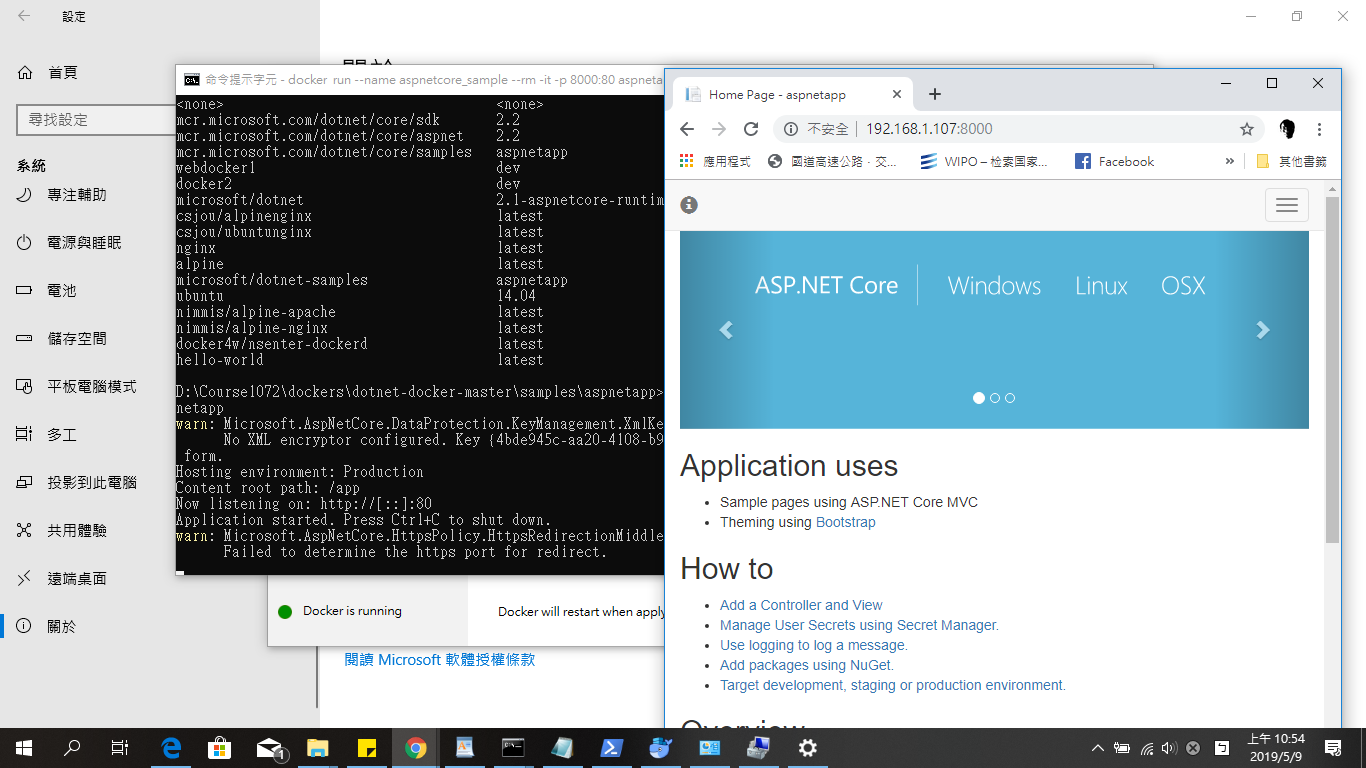
5. Test run
docker run --name aspnetcore_sample --rm -it -p 8000:80 aspnetapp

2019年5月5日 星期日

Test asp.net core ipv6

0-1. Hinet router
0-2. ASUS X450J @ Windows 10
0-3. asp.net core sdk 2.1

1. cmd ipconfig

ipv6 :   2001:b011:6c0b:1050:b976:96f3:d814:5fb

2. Program.cs (UseUrls("http://[ipv6]:5000/", "https://[ipv6]:5001")


3. chrome https://[2001:b011:6c0b:1050:b976:96f3:d814:5fb]:5001


4. mobile with the same WiFi Access Point


2019年4月14日 星期日

[C#] 目前沒有執行 ID 為 xxxx 的處理序

Ref: https://dotblogs.com.tw/onebin/2017/11/21/150815

VS 2017 @ Windows 10 x64

1. Download web (.net framework) solution folder from other computer.
2. 目前沒有執行 ID 為 xxxx 的處理序
3. Close vs2017
4. delete .vs (hidden) folder
5. Re-start


2019年2月17日 星期日

Windows 10 remote login ubuntu desktop

Ref: https://websiteforstudents.com/connect-to-ubuntu-16-04-17-10-18-04-desktop-via-remote-desktop-connection-rdp-with-xrdp/

1. Ubuntu desktop Install Xrdp Server
sudo apt install xrdp
sudo systemctl enable xrdp

2.
3. (取消查核)
4. 注意不可同時以相同帳號登入,遠端使用者須先自Ubuntu Desktop中登出,否則Remote desktop 會閃退。

2019年1月11日 星期五

Youtube直播不要急。

Youtube 經過(手機/語音)驗證後,需經啟用程序(**直播功能的啟用程序可能需要 24 小時才能完成)才可以使用,雖然顯示已經驗證,仍無法立刻開始直播。

2019年1月7日 星期一

更改 Google Form 樣式

Ref: https://www.brandeis.edu/communications/digital/toolkit/google-forms.html

1. Google Form template 選用
Google Form template 可以透過變更帳戶語言(English)方式,選用內建範本。

2. Google Form 字型變更,可以透過選取舊版本(click 右下角問號),進行編輯。


2018年12月27日 星期四

WebAR 測試

Ref: https://aframe.io/blog/arjs/
asp.net core sdk 2.1 @ windows 10 x64
1. dotnet new web -o wk15b


2. Program.cs
using System;
using System.Collections.Generic;
using System.IO;
using System.Linq;
using System.Threading.Tasks;
using Microsoft.AspNetCore;
using Microsoft.AspNetCore.Hosting;
using Microsoft.Extensions.Configuration;
using Microsoft.Extensions.Logging;

namespace wk15b
{
    public class Program
    {
        public static void Main(string[] args)
        {
            CreateWebHostBuilder(args).Build().Run();
        }

        public static IWebHostBuilder CreateWebHostBuilder(string[] args) =>
            WebHost.CreateDefaultBuilder(args)
.UseUrls("http://192.168.1.108:5000/","https://192.168.1.108:5001/")
                .UseStartup<Startup>();
    }
}
3. Startup.cs
using System;
using System.Collections.Generic;
using System.Linq;
using System.Threading.Tasks;
using Microsoft.AspNetCore.Builder;
using Microsoft.AspNetCore.Hosting;
using Microsoft.AspNetCore.Http;
using Microsoft.Extensions.DependencyInjection;

namespace wk15b
{
    public class Startup
    {
        // This method gets called by the runtime. Use this method to add services to the container.
        // For more information on how to configure your application, visit https://go.microsoft.com/fwlink/?LinkID=398940
        public void ConfigureServices(IServiceCollection services)
        {
services.AddMvc(); // Add
        }

        // This method gets called by the runtime. Use this method to configure the HTTP request pipeline.
        public void Configure(IApplicationBuilder app, IHostingEnvironment env)
        {
            if (env.IsDevelopment())
            {
                app.UseDeveloperExceptionPage();
            }
            else
            {
                app.UseExceptionHandler("/Error");
                app.UseHsts();
            }

            app.UseHttpsRedirection();
            app.UseStaticFiles();
            app.UseCookiePolicy();
            app.UseMvc();
        }
    }
}
4. wk1502.html
<!DOCTYPE html>
<html>
<head>
    <meta charset="utf-8">
    <script src="https://aframe.io/releases/0.8.0/aframe.min.js"></script>
    <script src="https://jeromeetienne.github.io/AR.js/aframe/build/aframe-ar.js"></script>
</head>
<body style='margin : 0px; overflow: hidden;'>
    <a-scene embedded arjs='sourceType: webcam;'>
        

        <!-- handle marker with hiro preset -->
        <a-marker preset='hiro'>
            <a-box position='0 2 -1' material='color: green;'></a-box>
        </a-marker>

      
    </a-scene>
</body>
</html>
5. Results