Ref: https://www.wpf-tutorial.com/audio-video/speech-recognition-making-wpf-listen/
Kinect SDK 1.8 SpeechBasic-WPF
1-1. ASUS X450J @ Windows 10 x64 Edu
1-2. Kinect SDK 1.8
1-3. Visual Studio 2017
2 Ex from https://www.wpf-tutorial.com/audio-video/speech-recognition-making-wpf-listen/
2-1 New WPF Project
2-2 Add System.Speech.DLL
2-3 using System.Speech.Recognition;
2-4
SpeechRecognitionEngine speechRecognizer = new SpeechRecognitionEngine();
public MainWindow()
{
InitializeComponent();
speechRecognizer.SpeechRecognized += SpeechRecognizer_SpeechRecognized;
GrammarBuilder grammarBuilder = new GrammarBuilder();
Choices commandChoices = new Choices("weight", "color", "size", "顏色");
grammarBuilder.Append(commandChoices);
Choices valueChoices = new Choices();
valueChoices.Add("normal", "bold");
valueChoices.Add("red", "green", "blue");
valueChoices.Add("small", "medium", "large");
valueChoices.Add("紅色", "黑色", "白色");
grammarBuilder.Append(valueChoices);
speechRecognizer.LoadGrammar(new Grammar(grammarBuilder));
speechRecognizer.SetInputToDefaultAudioDevice();
speechRecognizer.RecognizeAsync(RecognizeMode.Multiple);
}
private void SpeechRecognizer_SpeechRecognized(object sender, SpeechRecognizedEventArgs e)
{
this.Content = e.Result.Text;
//string command = e.Result.Words[0].Text.ToLower();
//string value = e.Result.Words[1].Text.ToLower();
}
private void Window_Closing(object sender, System.ComponentModel.CancelEventArgs e)
{
speechRecognizer.RecognizeAsyncStop();
speechRecognizer.Dispose();
}
3. Ref : SpeechBasic-WPF and ex2 Notes: The default CultureInfo is zh-TW
@ Microsoft.Speech ==> without zh-TW.
3-1 Add Ref
C:\WINDOWS\assembly\GAC_MSIL\Microsoft.Speech\11.0.0.0__31bf3856ad364e35\Microsoft.Speech.dll
3-2 using Microsoft.Speech.Recognition;
3-3
public partial class MainWindow : Window
{
SpeechRecognitionEngine speechRecognizer = new SpeechRecognitionEngine(new System.Globalization.CultureInfo("en-US"));
public MainWindow()
{
InitializeComponent();
speechRecognizer.SpeechRecognized += SpeechRecognizer_SpeechRecognized;
GrammarBuilder grammarBuilder = new GrammarBuilder();
grammarBuilder.Culture = new System.Globalization.CultureInfo("en-US");
// System.Threading.Thread.CurrentThread.CurrentCulture;
Choices commandChoices = new Choices("weight", "color", "size");
grammarBuilder.Append(commandChoices);
Choices valueChoices = new Choices();
valueChoices.Add("normal", "bold");
valueChoices.Add("red", "green", "blue");
valueChoices.Add("small", "medium", "large");
//valueChoices.Add("紅色", "黑色", "白色");
grammarBuilder.Append(valueChoices);
speechRecognizer.LoadGrammar(new Grammar(grammarBuilder));
speechRecognizer.SetInputToDefaultAudioDevice();
speechRecognizer.RecognizeAsync(RecognizeMode.Multiple);
}
private void SpeechRecognizer_SpeechRecognized(object sender, SpeechRecognizedEventArgs e)
{
this.Content = e.Result.Text;
string command = e.Result.Words[0].Text.ToLower();
string value = e.Result.Words[1].Text.ToLower();
}
private void Window_Closing(object sender, System.ComponentModel.CancelEventArgs e)
{
speechRecognizer.RecognizeAsyncStop();
speechRecognizer.Dispose();
}
2019年10月6日 星期日

2019年7月4日 星期四
docker jsp server
Ref: https://gist.github.com/hallazzang/c346e544b1c6fce8f304fdd5b2295fb6
ASUS X450J @ Windows 10 x64
docker
1. 檔案架構


ASUS X450J @ Windows 10 x64
docker
1. 檔案架構
yourproject/
    Dockerfile
    webapp/
        WEB-INF/
          classes/
          lib/
          web.xml
        index.jsp
yourproject/webapp/WEB-INF/web.xml

<web-app>
</web-app>

yourproject/webapp/index.jsp

<!doctype html>
<h1>It works!</h1>
<%
  for (int i = 0; i < 5; ++i) {
      out.println("<p>Hello, world!</p>");
  }
%>


Dockerfile

FROM tomcat:9.0.1-jre8-alpine
ADD ./webapp /usr/local/tomcat/webapps/webapp
CMD ["catalina.sh", "run"]
$ docker build -t mywebapp .

$ docker run --rm -it -p 8888:8080 mywebapp

2019年6月4日 星期二
nginx-ssl @ docker
Ref: http://www.ruanyifeng.com/blog/2018/02/nginx-docker.html
ASUS X450 @ Windows 10 x64 Prof
Docker version 18.09.2, build 6247962
openssl http://slproweb.com/products/Win32OpenSSL.html
1. Install openssl
2. Prepare certificate and key files
D:\ssl0604>"C:\Program Files\OpenSSL-Win64\bin\openssl.exe"
OpenSSL> req -newkey rsa:2048 -nodes -keyout key.pem -x509 -days 365 -out certificate.pem
ASUS X450 @ Windows 10 x64 Prof
Docker version 18.09.2, build 6247962
openssl http://slproweb.com/products/Win32OpenSSL.html
1. Install openssl
2. Prepare certificate and key files
D:\ssl0604>"C:\Program Files\OpenSSL-Win64\bin\openssl.exe"
OpenSSL> req -newkey rsa:2048 -nodes -keyout key.pem -x509 -days 365 -out certificate.pem
OpenSSL> x509 -text -noout -in
certificate.pem
3. copy *.pem into certs fold
4. docker run -d -p 8080:80 -p 8081:443 --name mynginx nginx
5. copy configuration fold
docker cp mynginx:/etc/nginx .
6. Modify conf.d/default.config
server {
listen 80;
server_name localhost;
#charset koi8-r;
#access_log /var/log/nginx/host.access.log main;
location / {
root /usr/share/nginx/html;
index index.html index.htm;
}
#error_page 404 /404.html;
# redirect server error pages to the static page /50x.html
#
error_page 500 502 503 504 /50x.html;
location = /50x.html {
root /usr/share/nginx/html;
}
# proxy the PHP scripts to Apache listening on 127.0.0.1:80
#
#location ~ \.php$ {
# proxy_pass http://127.0.0.1;
#}
# pass the PHP scripts to FastCGI server listening on 127.0.0.1:9000
#
#location ~ \.php$ {
# root html;
# fastcgi_pass 127.0.0.1:9000;
# fastcgi_index index.php;
# fastcgi_param SCRIPT_FILENAME /scripts$fastcgi_script_name;
# include fastcgi_params;
#}
# deny access to .htaccess files, if Apache's document root
# concurs with nginx's one
#
#location ~ /\.ht {
# deny all;
#}
}
server {
listen 443 ssl http2;
server_name localhost;
ssl on;
ssl_certificate /etc/nginx/certs/certificate.pem;
ssl_certificate_key /etc/nginx/certs/key.pem;
ssl_session_timeout 5m;
ssl_ciphers HIGH:!aNULL:!MD5;
ssl_protocols SSLv3 TLSv1 TLSv1.1 TLSv1.2;
ssl_prefer_server_ciphers on;
location / {
root /usr/share/nginx/html;
index index.html index.htm;
}
}
7. docker cp certs/. mynginx:/etc/nginx/certs/.
8. docker cp default.conf mynginx:/etc/nginx/conf.d/default.conf
9. docker exec -it mynginx /bin/bash
10. nginx -s stop (logout automatically)
11. docker start mynginx
12 chech https://ip:8081/
2019年5月29日 星期三
docker save @cmd (Windows 10)
Ref: https://www.assistanz.com/import-and-export-docker-images/
ASUS Windows 10 Pro 1803
Docker version 18.09.2, build 6247962
docker save (儲存 image)
1. docker save -o xxxx.tar image_name:ooo
2. copy xxxx.tar into USB
3. dock USB into target PC
4. docker load –i g:\xxxx.tar
5. docker run -d -p 8000:80 ngaframe(image name)
6. Test OK
ASUS Windows 10 Pro 1803
Docker version 18.09.2, build 6247962
docker save (儲存 image)
1. docker save -o xxxx.tar image_name:ooo
2. copy xxxx.tar into USB
3. dock USB into target PC
4. docker load –i g:\xxxx.tar
5. docker run -d -p 8000:80 ngaframe(image name)
6. Test OK
2019年5月8日 星期三
Get https://mcr.microsoft.com/v2/: net/http: request canceled while waiting for connection (Client.Timeout exceeded while awaiting headers)
Ref: https://github.com/dotnet/dotnet-docker/tree/master/samples/aspnetapp
https://stackoverflow.com/questions/46822391/docker-toolbox-tutorial-client-timeout-exceeded-while-awaiting-headers/48064026#48064026
docker for linux @ Windows 10 Prof 1803
1. Fail to build image as asp.net core app.
2. Error message:
Get https://mcr.microsoft.com/v2/: net/http: request canceled while waiting for connection (Client.Timeout exceeded while awaiting headers)
3. Change DNS Server from automatic to Fixed and Reset

4. Build aspnetapp images.
5. Test run
docker run --name aspnetcore_sample --rm -it -p 8000:80 aspnetapp
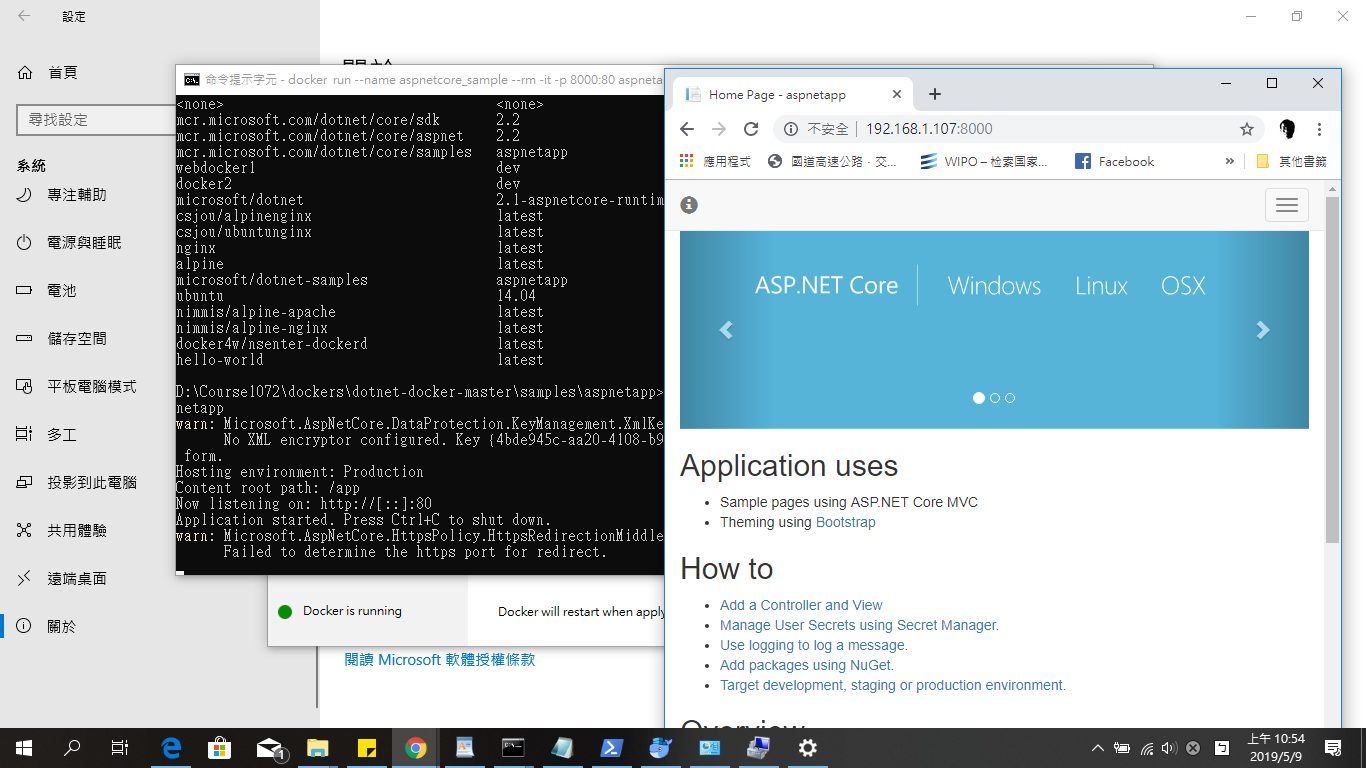
https://stackoverflow.com/questions/46822391/docker-toolbox-tutorial-client-timeout-exceeded-while-awaiting-headers/48064026#48064026
docker for linux @ Windows 10 Prof 1803
1. Fail to build image as asp.net core app.
2. Error message:
Get https://mcr.microsoft.com/v2/: net/http: request canceled while waiting for connection (Client.Timeout exceeded while awaiting headers)
3. Change DNS Server from automatic to Fixed and Reset
4. Build aspnetapp images.
5. Test run
docker run --name aspnetcore_sample --rm -it -p 8000:80 aspnetapp
2019年5月5日 星期日
Test asp.net core ipv6
0-1. Hinet router
0-2. ASUS X450J @ Windows 10
0-3. asp.net core sdk 2.1
1. cmd ipconfig

ipv6 : 2001:b011:6c0b:1050:b976:96f3:d814:5fb
2. Program.cs (UseUrls("http://[ipv6]:5000/", "https://[ipv6]:5001")

3. chrome https://[2001:b011:6c0b:1050:b976:96f3:d814:5fb]:5001

4. mobile with the same WiFi Access Point

0-2. ASUS X450J @ Windows 10
0-3. asp.net core sdk 2.1
1. cmd ipconfig
ipv6 : 2001:b011:6c0b:1050:b976:96f3:d814:5fb
2. Program.cs (UseUrls("http://[ipv6]:5000/", "https://[ipv6]:5001")
3. chrome https://[2001:b011:6c0b:1050:b976:96f3:d814:5fb]:5001
4. mobile with the same WiFi Access Point

2019年4月14日 星期日
[C#] 目前沒有執行 ID 為 xxxx 的處理序
Ref: https://dotblogs.com.tw/onebin/2017/11/21/150815
VS 2017 @ Windows 10 x64
1. Download web (.net framework) solution folder from other computer.
2. 目前沒有執行 ID 為 xxxx 的處理序
3. Close vs2017
4. delete .vs (hidden) folder
5. Re-start
VS 2017 @ Windows 10 x64
1. Download web (.net framework) solution folder from other computer.
2. 目前沒有執行 ID 為 xxxx 的處理序
3. Close vs2017
4. delete .vs (hidden) folder
5. Re-start
訂閱:
文章 (Atom)