Ref: https://www.assistanz.com/import-and-export-docker-images/
ASUS Windows 10 Pro 1803
Docker version 18.09.2, build 6247962
docker save (儲存 image)
1. docker save -o xxxx.tar image_name:ooo
2. copy xxxx.tar into USB
3. dock USB into target PC
4. docker load –i g:\xxxx.tar
5. docker run -d -p 8000:80 ngaframe(image name)
6. Test OK
2019年5月29日 星期三

2019年5月8日 星期三
Get https://mcr.microsoft.com/v2/: net/http: request canceled while waiting for connection (Client.Timeout exceeded while awaiting headers)
Ref: https://github.com/dotnet/dotnet-docker/tree/master/samples/aspnetapp
https://stackoverflow.com/questions/46822391/docker-toolbox-tutorial-client-timeout-exceeded-while-awaiting-headers/48064026#48064026
docker for linux @ Windows 10 Prof 1803
1. Fail to build image as asp.net core app.
2. Error message:
Get https://mcr.microsoft.com/v2/: net/http: request canceled while waiting for connection (Client.Timeout exceeded while awaiting headers)
3. Change DNS Server from automatic to Fixed and Reset

4. Build aspnetapp images.
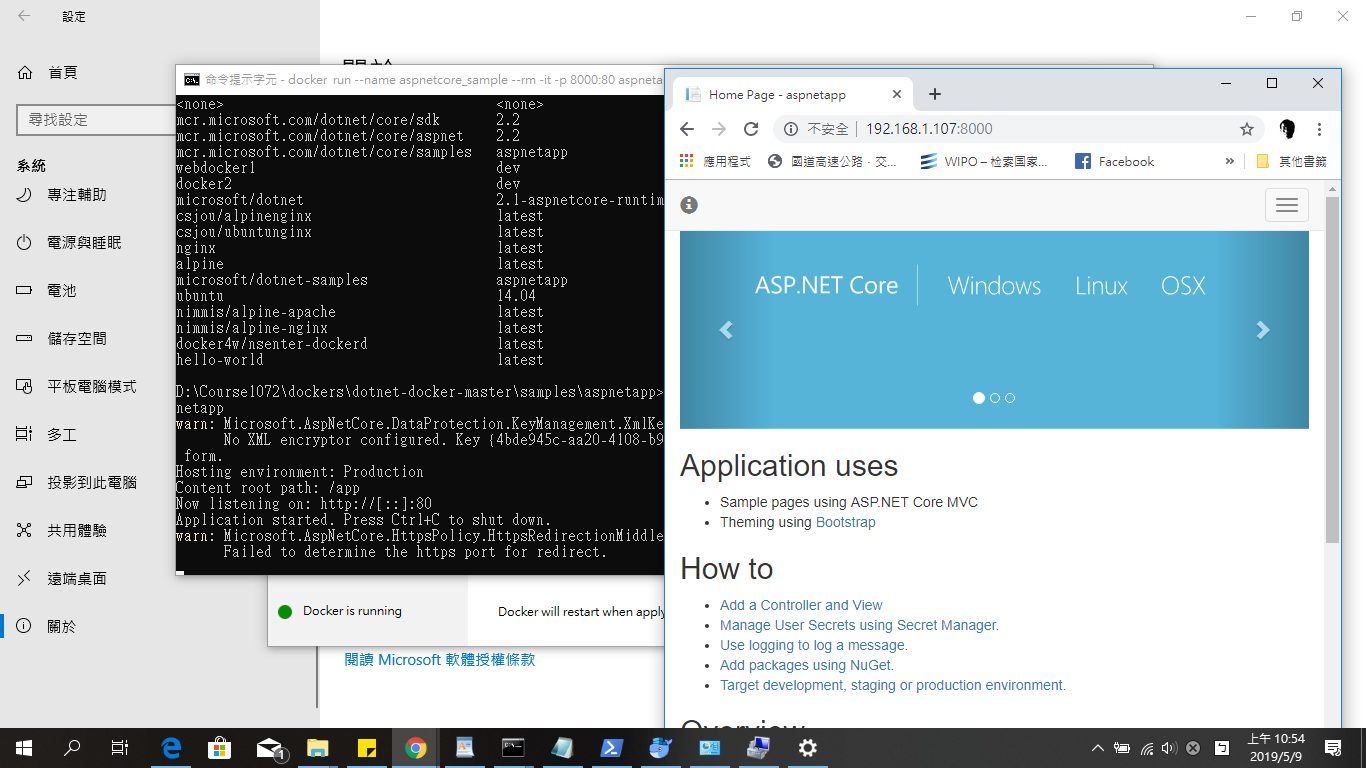
5. Test run
docker run --name aspnetcore_sample --rm -it -p 8000:80 aspnetapp
https://stackoverflow.com/questions/46822391/docker-toolbox-tutorial-client-timeout-exceeded-while-awaiting-headers/48064026#48064026
docker for linux @ Windows 10 Prof 1803
1. Fail to build image as asp.net core app.
2. Error message:
Get https://mcr.microsoft.com/v2/: net/http: request canceled while waiting for connection (Client.Timeout exceeded while awaiting headers)
3. Change DNS Server from automatic to Fixed and Reset
4. Build aspnetapp images.
5. Test run
docker run --name aspnetcore_sample --rm -it -p 8000:80 aspnetapp
2019年5月5日 星期日
Test asp.net core ipv6
0-1. Hinet router
0-2. ASUS X450J @ Windows 10
0-3. asp.net core sdk 2.1
1. cmd ipconfig

ipv6 : 2001:b011:6c0b:1050:b976:96f3:d814:5fb
2. Program.cs (UseUrls("http://[ipv6]:5000/", "https://[ipv6]:5001")

3. chrome https://[2001:b011:6c0b:1050:b976:96f3:d814:5fb]:5001

4. mobile with the same WiFi Access Point

0-2. ASUS X450J @ Windows 10
0-3. asp.net core sdk 2.1
1. cmd ipconfig
ipv6 : 2001:b011:6c0b:1050:b976:96f3:d814:5fb
2. Program.cs (UseUrls("http://[ipv6]:5000/", "https://[ipv6]:5001")
3. chrome https://[2001:b011:6c0b:1050:b976:96f3:d814:5fb]:5001
4. mobile with the same WiFi Access Point

2019年4月14日 星期日
[C#] 目前沒有執行 ID 為 xxxx 的處理序
Ref: https://dotblogs.com.tw/onebin/2017/11/21/150815
VS 2017 @ Windows 10 x64
1. Download web (.net framework) solution folder from other computer.
2. 目前沒有執行 ID 為 xxxx 的處理序
3. Close vs2017
4. delete .vs (hidden) folder
5. Re-start
VS 2017 @ Windows 10 x64
1. Download web (.net framework) solution folder from other computer.
2. 目前沒有執行 ID 為 xxxx 的處理序
3. Close vs2017
4. delete .vs (hidden) folder
5. Re-start
2019年2月17日 星期日
Windows 10 remote login ubuntu desktop
Ref: https://websiteforstudents.com/connect-to-ubuntu-16-04-17-10-18-04-desktop-via-remote-desktop-connection-rdp-with-xrdp/
1. Ubuntu desktop Install Xrdp Server
sudo apt install xrdp
sudo systemctl enable xrdp
2.
 3. (取消查核)
 4. 注意不可同時以相同帳號登入,遠端使用者須先自Ubuntu Desktop中登出,否則Remote desktop 會閃退。
1. Ubuntu desktop Install Xrdp Server
sudo apt install xrdp
sudo systemctl enable xrdp
2.


2019年1月11日 星期五

2019年1月7日 星期一
更改 Google Form 樣式
Ref: https://www.brandeis.edu/communications/digital/toolkit/google-forms.html
1. Google Form template 選用
Google Form template 可以透過變更帳戶語言(English)方式,選用內建範本。
2. Google Form 字型變更,可以透過選取舊版本(click 右下角問號),進行編輯。
1. Google Form template 選用
Google Form template 可以透過變更帳戶語言(English)方式,選用內建範本。
2. Google Form 字型變更,可以透過選取舊版本(click 右下角問號),進行編輯。
訂閱:
文章 (Atom)