2022年8月17日 星期三

embeded vlc streaming play

 Ref-https://www.cnblogs.com/cplemom/p/13956092.html

WPF app + embedded vlc players

1. new wpf project   framework 4.7.2

2. add nuget package

Install-Package Vlc.DotNet.Wpf -Version 3.1.0

Vlc.DotNet.Core

Vlc.DotNet.Core.Interops

Vlc.DotNet.Wpf

3. xmal file ; add xmlns 

 xmlns:v="clr-namespace:Vlc.DotNet.Wpf;assembly=Vlc.DotNet.Wpf"

4. xaml file add 2 VlcControl

<Grid x:Name="g1" >

        <Grid>

            <v:VlcControl Name="vlcControl1" Margin="427,0,0,0"/>

        </Grid>

        <Grid>

            <v:VlcControl Name="vlcControl2" Margin="0,0,413,0"/>

        </Grid>

    </Grid>

5. xaml.cs file x64 vlcplay 

InitializeComponent();

string VLCPath = @"C:\Program Files\VideoLAN\VLC";

vlcControl1.SourceProvider.CreatePlayer(new System.IO.DirectoryInfo(VLCPath));

string url = @"https://test-videos.co.uk/vids/bigbuckbunny/mp4/h264/360/Big_Buck_Bunny_360_10s_30MB.mp4";

if (!string.IsNullOrWhiteSpace(url))

{

      vlcControl1.SourceProvider.MediaPlayer.Play(new Uri(url));

}

vlcControl2.SourceProvider.CreatePlayer(new System.IO.DirectoryInfo(VLCPath));

string url2 = @"rtmp://192.168.1.102/stream/passingcode";

            if (!string.IsNullOrWhiteSpace(url2))

            {

                vlcControl2.SourceProvider.MediaPlayer.Play(new Uri(url2));

            }

5. Select x64 mode 

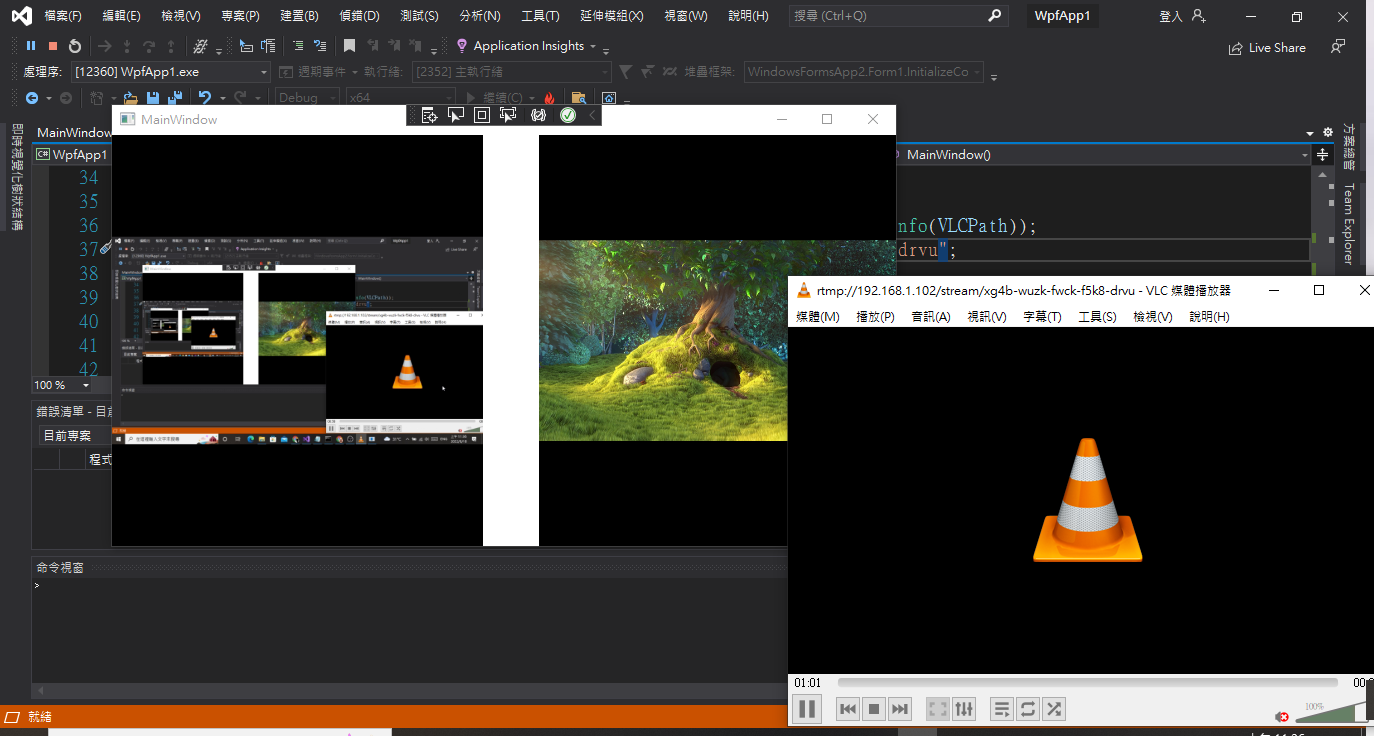
6. excute rtmp://192.168.1.102/stream/passingcode

7. run

8.Result :

2021年11月7日 星期日

julia test (I)

 REF: https://julialang.org/downloads/

julia-1.6.3-win64.exe

Add julia path

Hello world

1) interactive hello world (println)

2) Create ex1.jl

copy con ex1.jl

println("hello world.")

ctrl+z

julia ex1.jl


2021年5月5日 星期三

License_Plate_Recognition_in_CSharp

 REF:

1)https://www.emgu.com/wiki/index.php/License_Plate_Recognition_in_CSharp

2)https://github.com/fasetto/license-plate-recognition/blob/master/src/LPlateRecognition.UI/ViewModels/MainViewModel.cs

Windows 10 x64 @ ASUS X450

Visual Studio 2019

建置程序

1) New FormApp

2) Nuget 

emgu.cv 3.4.3.3016

Tesseract.Net SDK 1.18.342

3) Add class (Ref:1)

using Emgu.CV;
using Emgu.CV.CvEnum;
using Emgu.CV.OCR;
using Emgu.CV.Structure;
using Emgu.CV.Util;
using Emgu.Util;
using Patagames.Ocr;
using Patagames.Ocr.Enums;
//---###
using (UMat tmp = filteredPlate.Clone())
       {
          string plainText;
          using (var api = OcrApi.Create())
          {
            api.Init(Languages.English);
            api.SetVariable("tessedit_char_whitelist", "ABCDEFGHIJKLMNOPQRSTUVWXYZ-1234567890");
            plainText = api.GetTextFromImage(tmp.Bitmap);
           }
           //_ocr.Recognize(tmp);
          //words = _ocr.GetCharacters();
                                //if (words.Length == 0) continue;
                                if (plainText.Length == 0) continue;
                                //for (int i = 0; i < words.Length; i++)
                                for (int i = 0; i < plainText.Length; i++)
                                {
                                    strBuilder.Append(plainText[i]);
                                }
                            }
//---###
4) Form1.cs
public Form1()
        {
            InitializeComponent();
            imageBox1.Image = new Image<Bgr, byte>(@"C:\Users\csjou\Downloads\license-plate2.jpg");
        }

        private void button1_Click(object sender, EventArgs e)
        {
            LicensePlateDetector LPD = new LicensePlateDetector("test");
            Mat m = new Image<Bgr, byte>(imageBox1.Image.Bitmap).Mat;
            List<IInputOutputArray> licensePlateImagesList = new List<IInputOutputArray>();
            List<IInputOutputArray> filteredLicensePlateImagesList = new List<IInputOutputArray>();
            List<RotatedRect> licenseBoxList = new List<RotatedRect>();
            List<string> words = LPD.DetectLicensePlate(
            m,
            licensePlateImagesList,
            filteredLicensePlateImagesList,
            licenseBoxList
            );
            this.Text = "";
            for (int i = 0; i < words.Count; i++)
                this.Text += words[i];
        }


emgu 轉換

 REF: http://ferris2014.blogspot.com/2016/06/opencv-emgu-mat-to-image-image-to-mat.html

Mat to image, image to Mat, image to imagebox, imagebox to image, Mat to imagebox, imagebox to Mat

1. Mat to image

_img = _mat.ToImage<bgr, Byte>();

2. image to Mat

_mat = _img.Mat;

3. image to imagebox

imagebox1.Image=_img;

4. imagebox to image

_img = new Image<bgr, byte>(imageBox1.Image.Bitmap)

5. Mat to imagebox

imagebox1.Image=_mat;

6. imagebox to Mat

(Step4 + Step2)

_img= new Image<bgr, byte>(imageBox1.Image.Bitmap).Mat;

2021年1月26日 星期二

CMake 入門/簡單的範例 (Windows 10)

REF: https://zh.m.wikibooks.org/zh-tw/CMake 入門/簡單的範例

1. Windows 10 x64 @ ASUS X450J

2. Prepare files 

3. cd D:\Course1092\AI1092\cmakes\ex2/src
4. cmake --build .

5. cd Debug
6. ./ex2.exe


2021年1月25日 星期一

Intel OpenVINO Installation & run demo ( could not find any instance of Visual Studio.)

 REF:https://medium.com/ching-i/intel-openvino%E4%BB%8B%E7%B4%B9%E8%88%87%E5%AE%89%E8%A3%9D%E6%95%99%E5%AD%B8-15b07473d998


1. Register Intel Account

2. Download full package

3. Install


4. Upgrade cmake
4-1 Download cmake.msi
https://cmake.org/download/
4-2 Install cmake
cmake-3.19.3-win64-x64.msi
5. Reinstall

6. Done
7. Set vars
C:\Program Files (x86)\Intel\openvino_2021.2.185\bin
8. Install Ironpython
https://github.com/IronLanguages/ironpython2/releases/
9. Add Python path
10. setupvars.bat
11 Add vars

npm install --global --production windows-build-tools --vs2015

--------- Run Demo
Get Started with OpenVINO™ Toolkit on Windows* - OpenVINO™ Toolkit
Powershell

./demo_security_barrier_camera -d CPU
cd "C:\Program Files (x86)\Intel\openvino_2021\deployment_tools\demo"


2020年12月9日 星期三

DataGrid and OleDb Connection Test

1. Windows 10 x64 @ ASUS X450J

2. Visual Studio 2019

3. Install Microsoft Access Database Engine 2010 可轉散發套件

https://www.microsoft.com/zh-tw/download/details.aspx?id=13255

4. Northwind.xls (Customer Sheet)

Ex1 Console (.NET Framework)

using System;

using System.Collections.Generic;

using System.Linq;

using System.Text;

using System.Threading.Tasks;

namespace oledbEx1

{

    using System.Data;

    using System.Data.OleDb;

    class Program

    {

        static void Main(string[] args)

        {

            DataTable DT = OleDbGetTable("SELECT * FROM [Customers$]", "Northwind.xlsx");

            Console.WriteLine(DT.Rows.Count);

            Console.ReadLine();

        }

        static public DataTable OleDbGetTable(string SQL, string path1)

        {

            DataSet DS = new DataSet();

            OleDbConnection conn = new OleDbConnection("Provider=Microsoft.ACE.OLEDB.12.0;Data Source=" + path1 + ";Extended Properties='Excel 12.0 Xml; HDR = YES';");

            conn.Open();

            OleDbDataAdapter apt = new OleDbDataAdapter(SQL, conn);

            apt.Fill(DS);

            conn.Close();

            return DS.Tables[0];

        }

    }

}

 Ex2 Form (.NET Framework)

namespace FormEx1

{

    using System.Data.OleDb;

    public partial class Form1 : Form

    {

        public Form1()

        {

            InitializeComponent();

            DataGridView dataGridView1 = new DataGridView();

            this.Controls.Add(dataGridView1);

            dataGridView1.Dock = DockStyle.Fill;

            DataTable DT = OleDbGetTable("SELECT * FROM [Customers$]", "Northwind.xlsx");

            dataGridView1.DataSource = DT.DefaultView;

        }

        public DataTable OleDbGetTable(string SQL, string path1)

        { ...}

  }

}

Ex3 Form (.NET Core 3.x)

nuget Add System.Data.OleD

Ex4 WPF (.NET Framework)

using System;

using System.Collections.Generic;

using System.Linq;

using System.Text;

using System.Threading.Tasks;

using System.Windows;

using System.Windows.Controls;

using System.Windows.Data;

using System.Windows.Documents;

using System.Windows.Input;

using System.Windows.Media;

using System.Windows.Media.Imaging;

using System.Windows.Navigation;

using System.Windows.Shapes;

namespace WPFEx1

{

    using System.Data.OleDb;

    using System.Data;

    /// <summary>

    /// MainWindow.xaml 的互動邏輯

    /// </summary>

    public partial class MainWindow : Window

    {

        public MainWindow()

        {

            InitializeComponent();

            DataGrid dataGridView1 = new DataGrid();

            Grid G1 = new Grid();

            this.Content = G1;

            G1.Children.Add(dataGridView1);

            DataTable DT = OleDbGetTable("SELECT * FROM [Customers$];", "Northwind.xlsx");

            dataGridView1.ItemsSource = DT.DefaultView;

        }

        public DataTable OleDbGetTable(string SQL, string path1)

        {... }


    }

}

Ex5 WPF (.NET Core 3.x)

nuget Add System.Data.OleD

Ex6 Web (.NET Framework)

using System;

using System.Collections.Generic;

using System.Linq;

using System.Web;

using System.Web.UI;

using System.Web.UI.WebControls;

namespace WebApp1

{

    using System.Data;

    using System.Data.OleDb;

    public partial class WebForm1 : System.Web.UI.Page

    {

        protected void Page_Load(object sender, EventArgs e)

        {

            DataGrid dataGridView1 = new DataGrid();

            form1.Controls.Add(dataGridView1);

            DataTable DT = OleDbGetTable("SELECT * FROM [Customers$];", Server.MapPath("Northwind.xlsx"));

            dataGridView1.DataSource = DT.DefaultView;

            dataGridView1.DataBind();

       }

        public DataTable OleDbGetTable(string SQL, string path1)

        { ...   }

    }

}