2018年11月17日 星期六

Helixtoolkit Input Gesture

1. 原來在 http://helixtoolkit.codeplex.com/wikipage?title=Input%20gestures&referringTitle=Documentation 的說明,網路上找不到了。
2. 儲存的文件,供參考。


2018年11月9日 星期五

C# plplot 1 - Simple plot

Ref: http://plplot.sourceforge.net/docbook-manual/plplot-html-5.13.0/simple-graph.html

VS 2017 @ Windows 10 x64 (ASUS X450J)

In order to draw such a simple graph, it is necessary to call at least four of the PLplot functions:
  1. plinit, to initialize PLplot.
  2. plenv, to define the range and scale of the graph, and draw labels, axes, etc.
  3. One or more calls to plline or plstring to draw lines or points as needed. Other more complex routines include plbin and plhist to draw histograms, and plerrx and plerry to draw error-bars.
  4. plend, to close the plot.
1-1 New console project
1-2 nuget add  plplot (5.13.4 latest 5.13.7)
1-3 using PLplot;
1-4 example 0x1
1-5 error
System.BadImageFormatException: '試圖載入格式錯誤的程式。 (發生例外狀況於 HRESULT: 0x8007000B)'
1-6 Any cpu 改成 x64
double[] x = new double[10], y = new double[10];
            for (int i=0; i<10; i++)
            {
                x[i] = (double)i;
                y[i] = Math.Pow(x[i], 2);
            }
            var pl = new PLStream();
            pl.sdev("pngcairo");
            pl.sfnam("pngex1.png");
            pl.spal0("cmap0_alternate.pal");
            pl.init();
            pl.env(0, 10, 0, 100, AxesScale.Independent, AxisBox.BoxTicksLabelsAxes);
            pl.schr(0, 1.25);
            pl.lab("X-axis", "Y-axis", "Title");
            pl.col0(9);
            pl.line(x, y);
            pl.col0(3);
            pl.sym(x, y, '0');
            pl.eop();
            pl.gver(out var verText);
            //Console.ReadLine();
            Console.WriteLine("Showing chart...");
            var p = new Process();
            string chartFileNamePath = @".\" + "pngex1.png";
            p.StartInfo = new ProcessStartInfo(chartFileNamePath)
            {
                UseShellExecute = true
            };
            p.Start();
           // Console.ReadLine();
1-7 Console mode 程式需結束,否則會有一個大的黑色方塊在中下方。
1-8 座標軸標示無法處理中文。

2018年11月8日 星期四

a-frame 全景內外層不同貼圖

Ref: https://stackoverflow.com/questions/39626036/how-do-i-texture-the-inside-of-a-cylinder-in-a-frame

1. a-frame 沒有backmaterial 屬性,只有src設定貼圖。
2. side="double" 設定內外相同貼圖。
3. 內側貼圖鏡射圖。
4. 內側以鏡射圖貼於略小模型,如下:

<a-assets>
    <img id="sky" src="grid.png">
    <img id="ins" src="grid鏡射圖.png">
</a-assets>
<a-sphere radius="2.99" side="double" src="#ins"/>
<a-sphere radius="3" src="#sky"/>

2018年10月30日 星期二

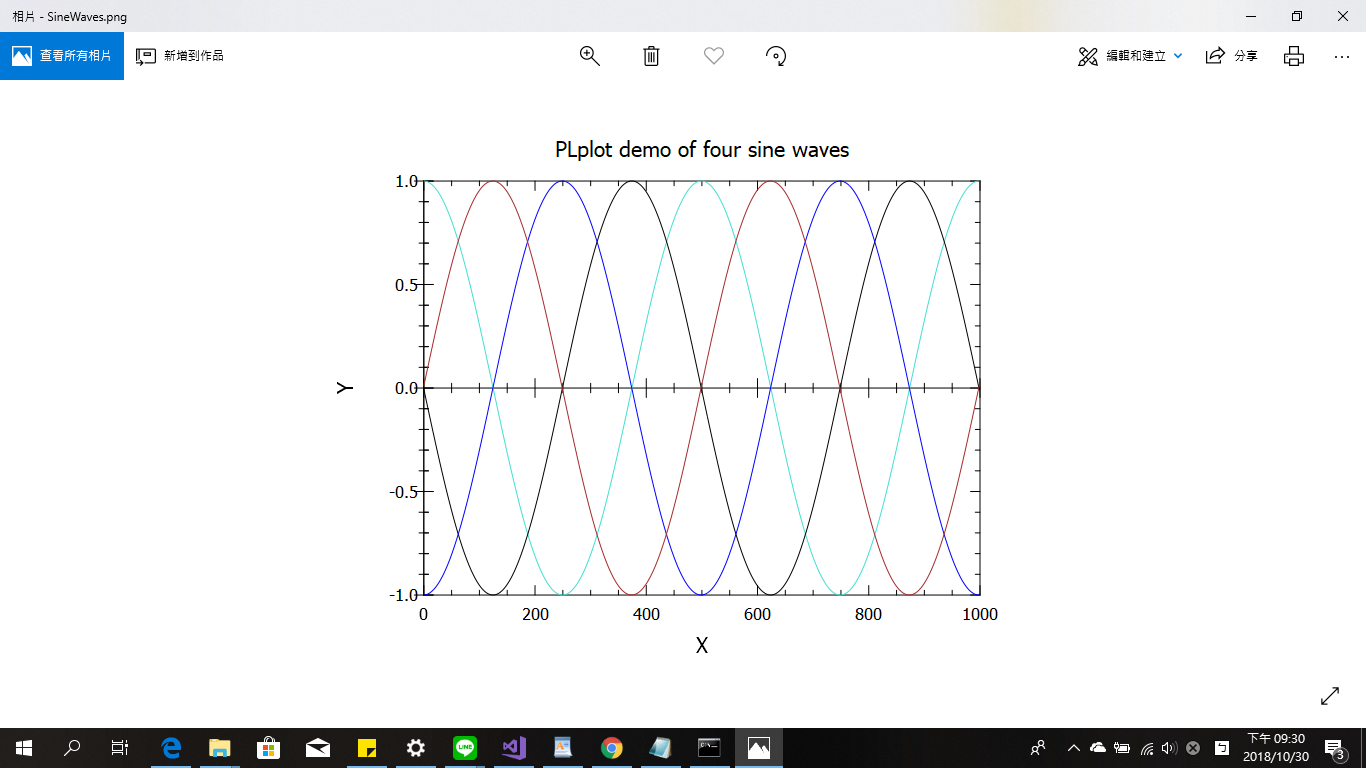
plplot 5.13.7 error: 無法載入 DLL 'plplot

1. ASUS X450J @ Windows 10 x64 VS2017
2. Ref: https://github.com/surban/PLplotNet/blob/master/Samples/CSharp/SineWaves/Program.cs
3. Ref: https://docs.microsoft.com/zh-tw/dotnet/machine-learning/tutorials/taxi-fare
            Console.WriteLine("Showing chart...");
            var p = new Process();
            string chartFileNamePath = @".\" + "SineWaves.png";
            p.StartInfo = new ProcessStartInfo(chartFileNamePath)
            {
                UseShellExecute = true
            };
            p.Start();
4. 5.13.7 error 無法載入 DLL 'plplot
5. Change into 5.13.4
Any CPU
System.BadImageFormatException: '試圖載入格式錯誤的程式。 (發生例外狀況於 HRESULT: 0x8007000B)'
6. x64 OK


2018年10月23日 星期二

Failed to load dae file: the server responded with a status of 404 ()

1. asp.net core failed to load dae file and the server responded with a status of 404 ().
2. Add mime type as follows
public void Configure(IApplicationBuilder app, IHostingEnvironment env)
        {
            //app.UseStaticFiles();
            var provider = new FileExtensionContentTypeProvider();
            // Add new mappings
            provider.Mappings[".dae"] = "application/octet-stream";  // "text /xml"; 
            app.UseStaticFiles(new StaticFileOptions
            {
                FileProvider = new PhysicalFileProvider(
            Path.Combine(Directory.GetCurrentDirectory(), "wwwroot")),
                RequestPath = "",
                ContentTypeProvider = provider
            });
        }
3. 一旦可以讀取dae檔案,再移除mime type,仍可以載入dae檔案。

2018年8月29日 星期三

Edge Error Code: INET_E_RESOURCE_NOT_FOUND

Edge @ Windows 10 can not access webpage (IE and Chrome can).


Edge Error Code: INET_E_RESOURCE_NOT_FOUND


2018年8月18日 星期六

清除第二顆硬碟Windows/Program files目錄

REF:https://superuser.com/questions/915173/delete-old-windows-program-files-from-second-drive

Windows 10 @  ASUS X450J
1. cmd @ administrator
2. takeown /F "D:\Program Files" /A /R /D Y
3. cacls "D:\Program Files" /T /grant administrators:F
4. rmdir /s /q "D:\Program Files"

users 目錄部分無法刪除。